Bifurcación de carriles PCIe y uso compartido del ancho de banda en placas madre MSI X870E / X870
Motherboards
En un sistema de cómputo, las líneas PCIe son proporcionadas tanto por el procesador como por el chipset para admitir una amplia gama de componentes. Para aprovechar mejor estas líneas y admitir varios dispositivos, los fabricantes de Placas Madre a menudo diseñan sus modelos para permitir que componentes como ranuras PCIe, ranuras SSD M.2 y puertos USB4 compartan el ancho de banda PCIe.
Aunque este enfoque permite una mayor flexibilidad, también puede introducir cierta complejidad y causar confusión en algunos usuarios. Para aclararlo, hemos recopilado una vista detallada de la configuración de bifurcación de líneas PCIe y el uso compartido de ancho de banda en las Placas Madre MSI X870E y X870.
MEG X870E GODLIKE
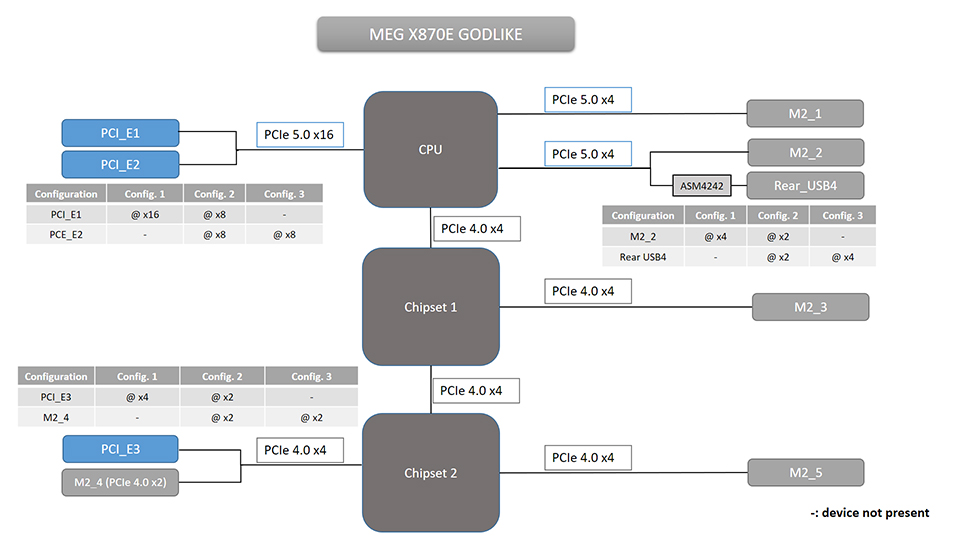
Especificaciones de PCIe / M.2 / USB4 y Vista General de Compartición de Líneas
A continuación se muestra un desglose detallado de cada ranura y puerto, incluyendo su conexión, velocidad admitida y cualquier configuración de ancho de banda compartido.
Ranura / Puerto
Conectado a
Velocidad Soportada
Comparte Ancho de Banda Con
PCI_E1
CPU
Hasta PCIe 5.0 x16
PCI_E2
PCI_E2
CPU
Hasta PCIe 5.0 x8
PCI_E1
PCI_E3
Chipset
Hasta PCIe 4.0 x4
M2_4
USB4
CPU
Hasta PCIe 5.0 x4
M2_2
M2_1
CPU
Hasta PCIe 5.0 x4
No
M2_2
CPU
Hasta PCIe 5.0 x4
USB4
M2_3
Chipset
Hasta PCIe 4.0 x4
No
M2_4
Chipset
Hasta PCIe 4.0 x2
PCI_E3
M2_5
Chipset
Hasta PCIe 4.0 x4
No
Notas sobre el uso compartido de Líneas PCIe:
- PCI_E1 y PCI_E2 comparten las líneas PCIe 5.0 x16 del CPU.
- PCI_E3 y M2_4 comparten las líneas PCIe 4.0 x4 del chipset.
- M2_2 y los puertos USB4 traseros comparten las líneas PCIe 5.0 x4 del CPU.
Bifurcación de Líneas PCIe Soportada en BIOS
Puedes configurar las opciones de bifurcación de líneas PCIe desde el BIOS.
Ranura
Bifurcación
PCI_E1 (CPU)
x16, o x8+x8, o x8+x4+x4, o x4+x4+x4+x4
MPG X870E CARBON WIFI
Especificaciones de PCIe / M.2 / USB4 y Vista General de Compartición de Líneas
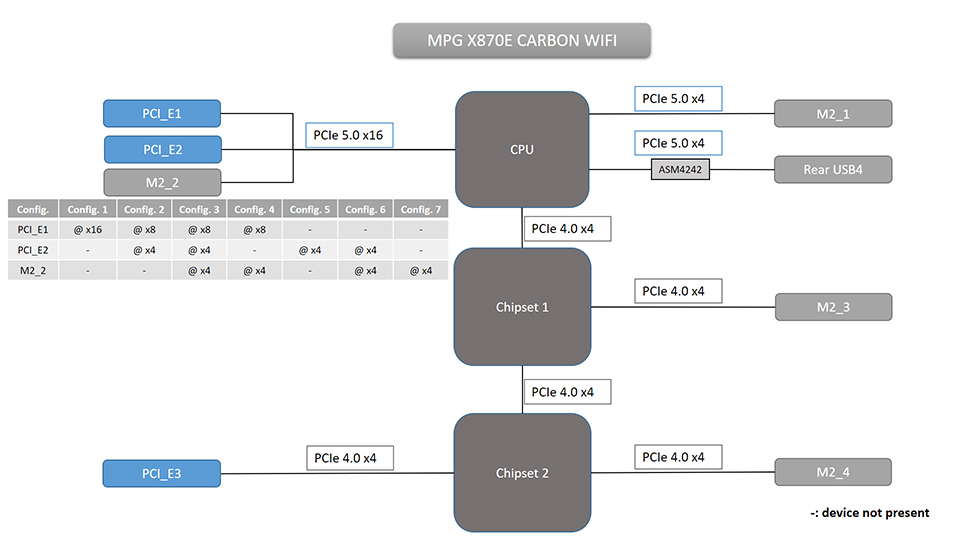
Ranura / Puerto
Conectado a
Velocidad Soportada
Comparte Ancho de Banda Con
PCI_E1
CPU
Hasta PCIe 5.0 x16
PCI_E2 y M2_2
PCI_E2
CPU
Hasta PCIe 5.0 x4
PCI_E1 y M2_2
PCI_E3
Chipset
Hasta PCIe 4.0 x4
No
USB4
CPU
Hasta PCIe 5.0 x4
No
M2_1
CPU
Hasta PCIe 5.0 x4
No
M2_2
CPU
Hasta PCIe 5.0 x4
PCI_E1 y PCI_E2
M2_3
Chipset
Hasta PCIe 4.0 x4
No
M2_4
Chipset
Hasta PCIe 4.0 x4
No
Notas sobre Compartición de Líneas PCIe:
- PCI_E1, PCI_E2 y M2_2 comparten las líneas PCIe 5.0 x16 del CPU.
Ranura
Bifurcación
PCI_E1 (CPU)
x16, o x8+x8, o x8+x4+x4, o x4+x4+x4+x4
MAG X870E TOMAHAWK WIFI
Especificaciones de PCIe / M.2 / USB4 y Vista General de Compartición de Líneas
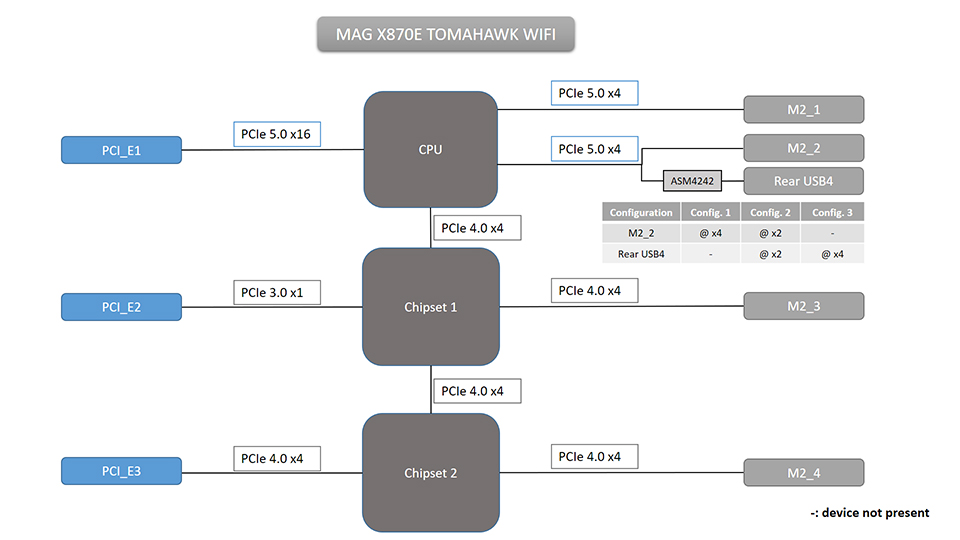
Ranura / Puerto
Conectado a
Velocidad Soportada
Comparte Ancho de Banda Con
PCI_E1
CPU
Hasta PCIe 5.0 x16
No
PCI_E2
Chipset
Hasta PCIe 3.0 x1
No
PCI_E3
Chipset
Hasta PCIe 4.0 x4
No
USB4
CPU
Hasta PCIe 5.0 x4
M2_2
M2_1
CPU
Hasta PCIe 5.0 x4
No
M2_2
CPU
Hasta PCIe 5.0 x4
USB4
M2_3
Chipset
Hasta PCIe 4.0 x4
No
M2_4
Chipset
Hasta PCIe 4.0 x4
No
Notas sobre Compartición de Líneas PCIe:
- M2_2 y el USB4 trasero comparten las líneas PCIe 5.0 x4 del CPU.
Ranura
Bifurcación
PCI_E1 (CPU)
x16, o x8+x8, o x8+x4+x4, o x4+x4+x4+x4
MAG X870 TOMAHAWK WIFI
Especificaciones de PCIe / M.2 / USB4 y Vista General de Compartición de Líneas
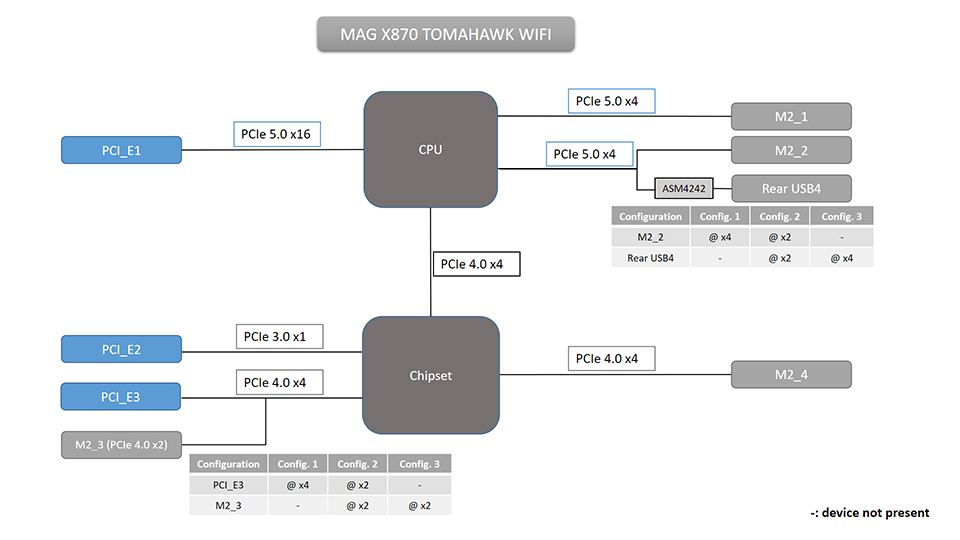
Ranura / Puerto
Conectado a
Velocidad Soportada
Comparte Ancho de Banda Con
PCI_E1
CPU
Hasta PCIe 5.0 x16
No
PCI_E2
Chipset
Hasta PCIe 3.0 x1
No
PCI_E3
Chipset
Hasta PCIe 4.0 x4
M2_3
USB4
CPU
Hasta PCIe 5.0 x4
M2_2
M2_1
CPU
Hasta PCIe 5.0 x4
No
M2_2
CPU
Hasta PCIe 5.0 x4
USB4
M2_3
Chipset
Hasta PCIe 4.0 x2
PCI_E3
M2_4
Chipset
Hasta PCIe 4.0 x4
No
Notas sobre Compartición de Líneas PCIe:
- M2_2 y el USB4 trasero comparten las líneas PCIe 5.0 x4 del CPU.
- PCI_E3 y M2_3 comparten las líneas PCIe 4.0 x4 del chipset.
Bifurcación de Líneas PCIe Soportada en BIOS
Ranura
Bifurcación
PCI_E1 (CPU)
x16, o x8+x8, o x8+x4+x4, o x4+x4+x4+x4
X870E GAMING PLUS WIFI
Especificaciones de PCIe / M.2 / USB4 y Vista General de Compartición de Líneas
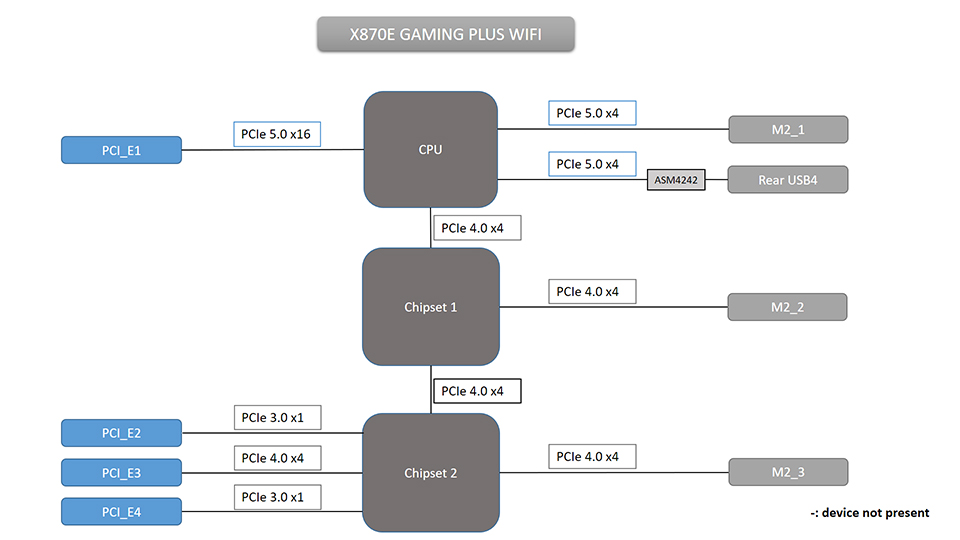
Ranura / Puerto
Conectado a
Velocidad Soportada
Comparte Ancho de Banda Con
PCI_E1
CPU
Hasta PCIe 5.0 x16
No
PCI_E2
Chipset
Hasta PCIe 3.0 x1
No
PCI_E3
Chipset
Hasta PCIe 4.0 x4
No
PCI_E4
Chipset
Hasta PCIe 3.0 x1
No
USB4
CPU
Hasta PCIe 5.0 x4
No
M2_1
CPU
Hasta PCIe 5.0 x4
No
M2_2
Chipset
Hasta PCIe 4.0 x4
No
M2_3
Chipset
Hasta PCIe 4.0 x4
No
Bifurcación de Líneas PCIe Soportada en BIOS
Ranura
Bifurcación
PCI_E1 (CPU)
x16, o x8+x8, o x8+x4+x4, o x4+x4+x4+x4
X870 GAMING PLUS WIFI
Especificaciones de PCIe / M.2 / USB4 y Vista General de Compartición de Líneas
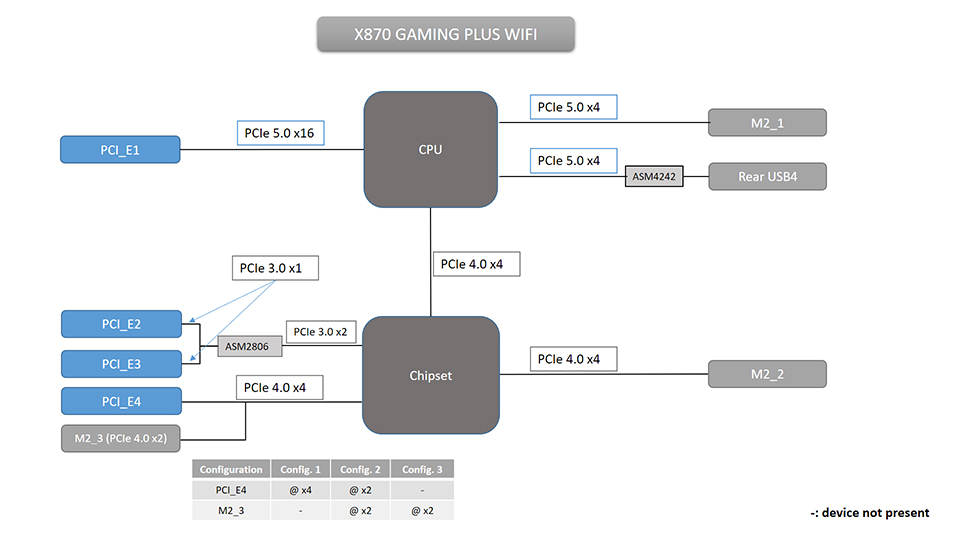
Ranura / Puerto
Conectado a
Velocidad Soportada
Comparte Ancho de Banda Con
PCI_E1
CPU
Hasta PCIe 5.0 x16
No
PCI_E2
Chipset
Hasta PCIe 3.0 x1
No
PCI_E3
Chipset
Hasta PCIe 3.0 x1
No
PCI_E4
Chipset
Hasta PCIe 4.0 x4
M2_3
USB4
CPU
Hasta PCIe 5.0 x4
No
M2_1
CPU
Hasta PCIe 5.0 x4
No
M2_2
Chipset
Hasta PCIe 4.0 x4
No
M2_3
Chipset
Hasta PCIe 4.0 x2
PCI_E4
Notas sobre Compartición de Líneas PCIe:
- PCI_E4 y M2_3 comparten las líneas PCIe 4.0 x4 del chipset.
Bifurcación de Líneas PCIe Soportada en BIOS
Ranura
Bifurcación
PCI_E1 (CPU)
x16, o x8+x8, o x8+x4+x4, o x4+x4+x4+x4
PRO X870E-P WIFI
Especificaciones de PCIe / M.2 / USB4 y Vista General de Compartición de Líneas
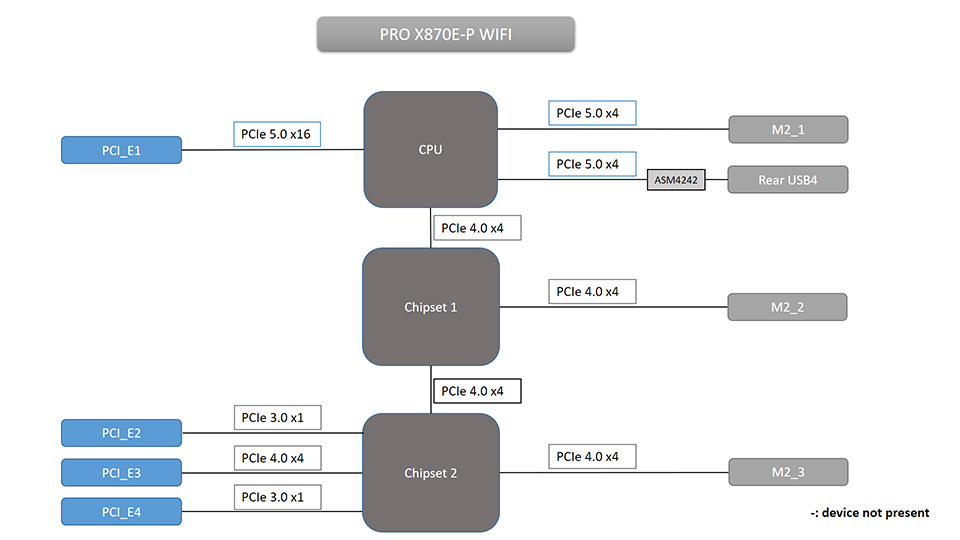
Ranura / Puerto
Conectado a
Velocidad Soportada
Comparte Ancho de Banda Con
PCI_E1
CPU
Hasta PCIe 5.0 x16
No
PCI_E2
Chipset
Hasta PCIe 3.0 x1
No
PCI_E3
Chipset
Hasta PCIe 4.0 x4
No
PCI_E4
Chipset
Hasta PCIe 3.0 x1
No
USB4
CPU
Hasta PCIe 5.0 x4
No
M2_1
CPU
Hasta PCIe 5.0 x4
No
M2_2
Chipset
Hasta PCIe 4.0 x4
No
M2_3
Chipset
Hasta PCIe 4.0 x4
No
Bifurcación de Líneas PCIe Soportada en BIOS
Ranura
Bifurcación
PCI_E1 (CPU)
x16, o x8+x8, o x8+x4+x4, o x4+x4+x4+x4
PRO X870-P WIFI
Especificaciones de PCIe / M.2 / USB4 y Vista General de Compartición de Líneas
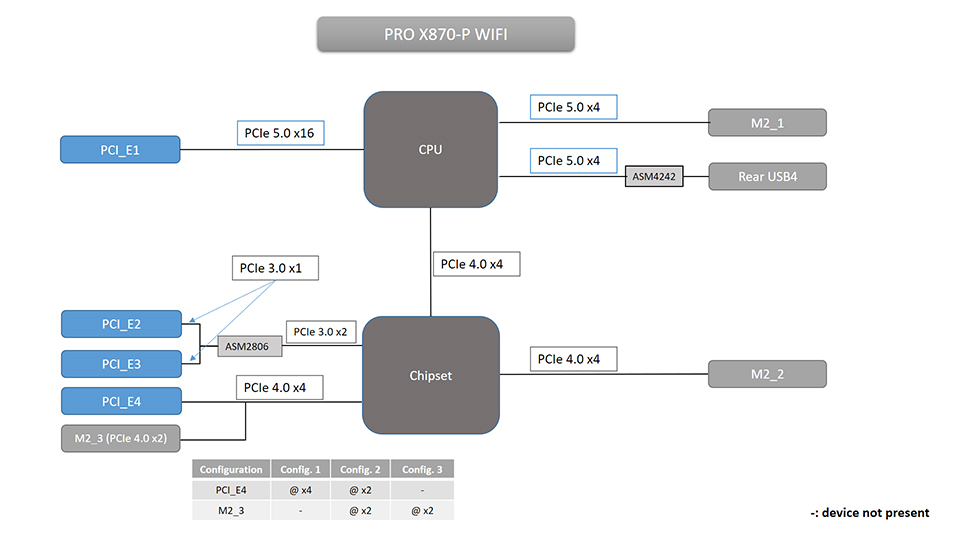
Ranura / Puerto
Conectado a
Velocidad Soportada
Comparte Ancho de Banda Con
PCI_E1
CPU
Hasta PCIe 5.0 x16
No
PCI_E2
Chipset
Hasta PCIe 3.0 x1
No
PCI_E3
Chipset
Hasta PCIe 3.0 x1
No
PCI_E4
Chipset
Hasta PCIe 4.0 x4
M2_3
USB4
CPU
Hasta PCIe 5.0 x4
No
M2_1
CPU
Hasta PCIe 5.0 x4
No
M2_2
Chipset
Hasta PCIe 4.0 x4
No
M2_3
Chipset
Hasta PCIe 4.0 x2
PCI_E4
Notas sobre Compartición de Líneas PCIe:
- PCI_E4 y M2_3 comparten las líneas PCIe 4.0 x4 del chipset.
Bifurcación de Líneas PCIe Soportada en BIOS
Ranura
Bifurcación
PCI_E1 (CPU)
x16, o x8+x8, o x8+x4+x4, o x4+x4+x4+x4
Nota:
Las configuraciones anteriores aplican al utilizar procesadores AMD Ryzen 7000 y Ryzen 9000 Series. Para conocer las limitaciones con procesadores Ryzen 8000 Series, por favor consulta la página web específica del producto.
Placas Madre MSI X870E/X870/B850/B840 para Gaming: https://latam.msi.com/Landing/amd-am5-x870e-x870-b850-b840-ryzen-9000-x3d-best-ai-gaming-motherboard